
FortiGate as a FortiSwitch and FortiAP Controller Behind a SonicWall: Design, Loops, and an 8.0.0 Bug
Run FortiGates as FortiSwitch and FortiAP controllers without routing traffic, fix the FortiLink spanning tree loop, and avoid the FortiOS 8.0.0 FortiLink bug.
You want Fortinet switching and wireless, but the firewall isn’t going anywhere. Maybe it’s a SonicWall with a year left on its license, maybe it’s a Palo Alto the security team won’t give up. Either way, you end up running FortiGates as nothing more than controllers for FortiSwitches and FortiAPs, with another vendor still doing the routing.
That setup works, and Fortinet support will sign off on it. But FortiOS assumes the FortiGate is your gateway, so a few things don’t behave the way you’d expect. Here’s the design I used on a recent deployment, plus the two problems that cost me the most time: a spanning tree loop the documentation doesn’t warn you about, and a FortiOS 8.0.0 bug that locked me out of FortiLink entirely.
The Starting Point
The client was replacing two Netgear switches and a set of Ubiquiti access points. The new hardware was four FortiSwitches, enough FortiAPs for one-to-one replacement, and a pair of FortiGates to manage them. A SonicWall HA pair stayed in place as the gateway.
The network itself was close to flat: one VLAN for users, servers, and management, and one VLAN for guests. Both gateways lived on the SonicWall, and DHCP came from a Windows server. The goal was to swap the switching and wireless without touching any of that.
Why the FortiGate Can’t Just Sit Passively
The tempting design is to put the FortiGates in some kind of transparent or passive role, since they won’t route anything. That doesn’t work. To manage FortiSwitches over FortiLink and act as a wireless controller for FortiAPs, the FortiGate has to run in NAT/routed mode with Layer 3 interfaces of its own.
The trick is to give the FortiGate routed interfaces for its management traffic only, and let it define everything else without routing it.
Step 1: A dedicated FortiLink management subnet
FortiLink gets its own management subnet and VLAN. In this build that was 10.0.70.0/24. Only switch management traffic crosses it, so the FortiSwitches connect to the FortiGates over ordinary Ethernet uplinks and nothing on the production side depends on it.
Step 2: Production VLANs with no IP address
The Data and Guest VLANs are created on the FortiGate under the FortiLink interface, but without an IP address. The FortiGate pushes those VLANs to every managed FortiSwitch, yet it has no presence in them. Clients keep pulling DHCP from the existing server, which keeps handing out the SonicWall as the default gateway.
The FortiGate defines and distributes the production VLANs, but it never routes them. Routing stays on the existing firewall.
Step 3: A native VLAN for AP management
FortiAPs have the same need as the switches: they have to reach the FortiGate over a management network to be discovered and managed. I created a separate AP management VLAN on the FortiGate, then set every AP-facing FortiSwitch port as a trunk with that VLAN as the native VLAN, and the Data and Guest VLANs as allowed VLANs.
The APs come up untagged on the management VLAN, get an address, and find their controller on their own, with no extra DHCP configuration on the Windows server or the SonicWall.
Fortinet support reviewed and approved both the switch and AP designs before cutover, which is worth doing on any non-standard Fortinet build.
The Physical Topology
The four FortiSwitches use auto-stack in a ring over their 10 Gbps ports: switch 1 to switch 2, 2 to 3, 3 to 4, and 4 back to 1. The FortiGate HA pair (active/passive) connects to the stack with four FortiLink uplinks:
- Switch 1 has one uplink to the active FortiGate and one to the passive FortiGate
- Switch 4 has the same pair of uplinks, so either end of the ring can fail without losing the controller
The SonicWall pair also lands on switches 1 and 4, so the gateway has a path from both ends of the stack.
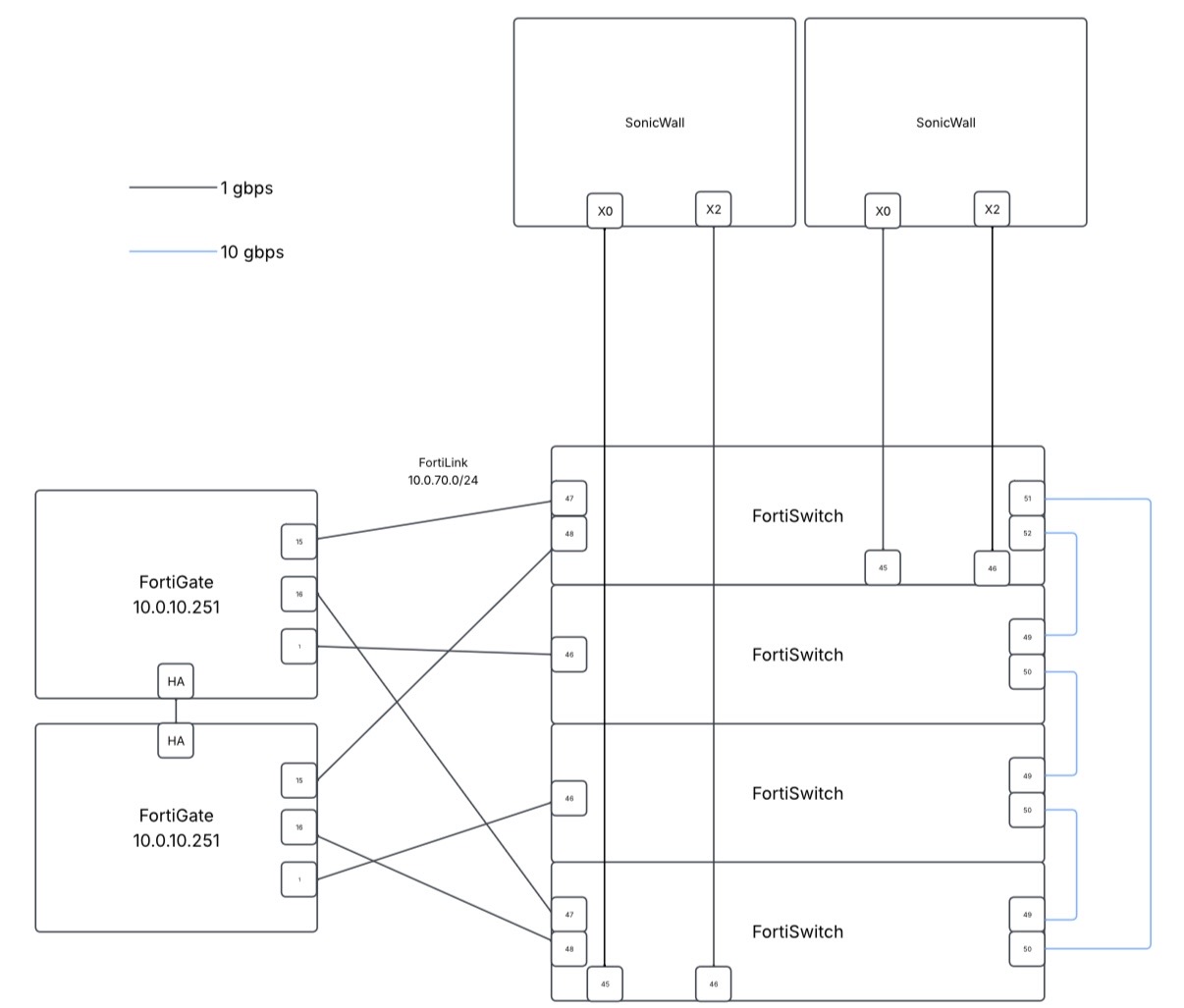
FortiGate HA pair managing a four-switch FortiSwitch ring over FortiLink (10.0.70.0/24). The SonicWall pair remains the gateway.
Problem 1: The Spanning Tree Loop
Once both ends of the stack were uplinked to the FortiGates, spanning tree problems followed. Two switches in the same stack each had FortiLink uplinks to the same FortiGate, and that made a loop.
My assumption was that FortiLink’s inter-switch link (ISL) handling would recognize the stack and take care of it. It doesn’t, and the documentation doesn’t make it obvious that you need to do anything. I also tried a firmware upgrade on the theory that my version was missing the feature. That didn’t fix it, and it caused Problem 2.
The fix is one setting on the FortiLink interface: Split interface. With it enabled, the FortiGate keeps only one of the FortiLink uplinks active and holds the other in reserve for failover, which breaks the loop.
If your FortiLink uplinks come from different switches in the same stack, enable Split interface on the FortiLink interface. ISL handling will not prevent the loop on its own.
Problem 2: “Failed to get FortiLink interface data” on FortiOS 8.0.0
The upgrade to FortiOS 8.0.0 made the FortiLink interface unmanageable. Adding a VLAN or changing any FortiLink setting failed, the FortiLink configuration page wouldn’t load, and the GUI showed this error:
Failed to get FortiLink interface data
Rebooting didn’t help. The only fix was downgrading back to FortiOS 7.6, after which everything behaved normally again. The client and I agreed to stay on the 7.6 train until a later 8.0 release addresses it.
If you’re seeing this error after an 8.0.0 upgrade and nothing else on the box has changed, a downgrade to 7.6 is a reasonable first move. Take a config backup before upgrading so you have one to restore.
Checklist for a Controller-Only FortiGate Build
- Run the FortiGate in routed mode. Give it Layer 3 interfaces for FortiLink and AP management only.
- Create production VLANs without IP addresses. The FortiGate distributes them; your existing firewall routes them.
- Use a native management VLAN on AP ports. APs get addressing and controller discovery without DHCP options.
- Enable Split interface whenever FortiLink uplinks come from more than one switch in a stack.
- Stay on a mature FortiOS release. Treat x.0.0 releases as lab-only, and keep a backup and a downgrade plan.
- Have Fortinet support review the design before cutover. It costs a ticket and saves a weekend.
Run into something like this?
We provide Tier 2/3 escalation support for MSPs, VARs, and internal IT teams. If your team is stuck on a problem like this one, we can help.